December 2025 Update: Covers LangChain 0.3+ with LCEL (LangChain Expression Language), async support, and production patterns.
Introduction
In recent years, language models have become more advanced, allowing us to tackle complex tasks and extract information from large documents. However, these models have a limit on the amount of context they can consider, which can be tricky when dealing with lots of information. To overcome this challenge, LLM chains have emerged. They simplify the process of chaining multiple LLM calls together, making it easier to handle large volumes of data.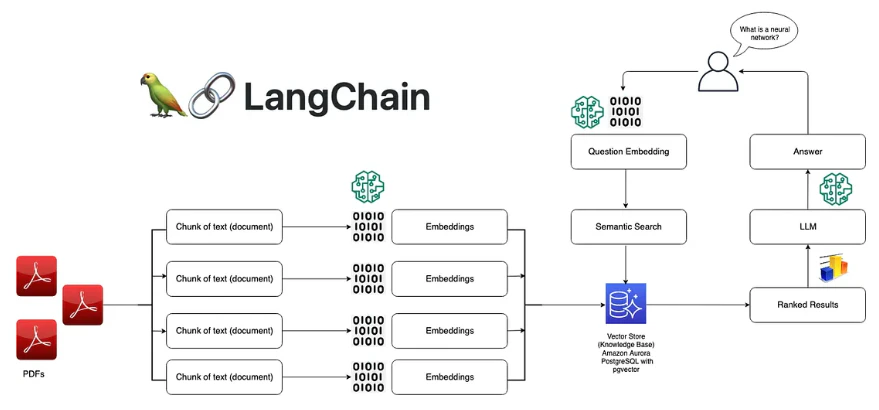
What is LangChain?
LangChain provides AI developers with tools to connect language models with external data sources.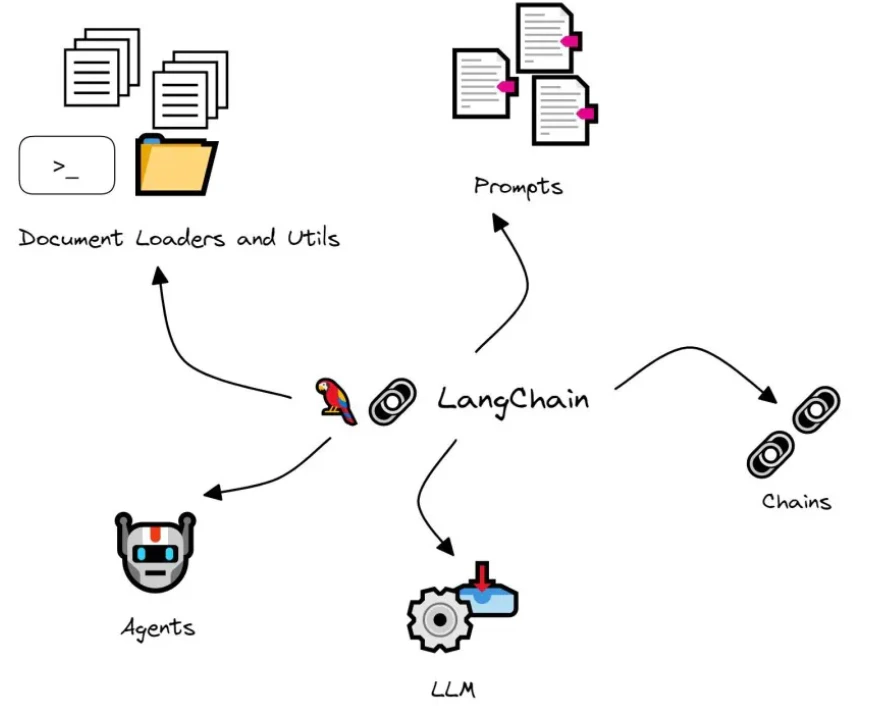
- Chains: Composable sequences of LLM calls
- Prompts: Template management and optimization
- Memory: Conversation and context management
- Tools: Integration with external APIs and functions
- Agents: Autonomous decision-making workflows
Why LangChain? While you can build AI apps with raw APIs, LangChain provides abstractions that make production systems easier to build, test, and maintain.
Installation
Core Concepts
1. LCEL (LangChain Expression Language)
LCEL is LangChain’s declarative way to compose chains:- Declarative syntax with pipe operator (
|) - Automatic async support
- Built-in streaming
- Easy debugging and observability
2. Prompts
Prompt Templates:3. Chains
Simple Chain:4. Memory
Conversation Buffer:5. Tools
Creating Tools:6. RAG with LangChain
Complete RAG Chain:7. Streaming
Streaming Responses:8. Observability with LangSmith
Production Patterns
Error Handling
Caching
Batch Processing
Output Parsing
Structured Output:When to Use LangChain
Use LangChain when:- Building complex multi-step workflows
- Need prompt management and versioning
- Require memory/conversation management
- Integrating multiple tools and APIs
- Want built-in observability (LangSmith)
- Building production systems that need maintainability
- Need to compose different LLM providers
- Simple one-off LLM calls
- Maximum performance is critical
- Want minimal dependencies
- Building lightweight prototypes
- Need fine-grained control over every API call
Limitations
- Additional abstraction layer adds overhead
- Learning curve for LCEL syntax
- Dependency on LangChain ecosystem
- Can be overkill for simple use cases
- Version changes can break code
Performance Tips
- Use async methods (
ainvoke,astream) for better concurrency - Enable caching for repeated queries
- Batch process when possible
- Use streaming for better UX
- Monitor with LangSmith to identify bottlenecks
- Cache embeddings and prompts when possible
Key Takeaways
LCEL is Powerful
Use the pipe operator (|) to compose chains declaratively.
Prompts as Templates
Manage prompts separately from code for easier iteration.
Memory Built-in
LangChain provides multiple memory types for conversations.
Production Ready
Built-in observability, caching, and error handling.
What’s Next
LangGraph
Learn how to build complex agent workflows with state machines
Interview Deep-Dive
When would you use LangChain versus building directly on the OpenAI or Anthropic SDK? What does LangChain buy you and what does it cost?
When would you use LangChain versus building directly on the OpenAI or Anthropic SDK? What does LangChain buy you and what does it cost?
Strong Answer:
- The way I think about this is: LangChain is a framework tax, and like all taxes, whether it is worth paying depends on what you get in return. For a simple chatbot that calls one LLM with a fixed prompt, LangChain adds complexity with zero benefit — you are wrapping a 5-line API call in 50 lines of abstraction. For that, I use the SDK directly.
- LangChain earns its keep when your application has three or more of these requirements: chaining multiple LLM calls with data flowing between them, plugging in retrieval from vector stores, managing conversation memory across turns, integrating external tools, supporting multiple LLM providers with a common interface, or needing observability via LangSmith. If you are building any of those from scratch with raw SDKs, you end up reinventing half of LangChain anyway, but worse.
- The concrete benefits: LCEL’s pipe operator gives you composable chains with free async support and streaming. The memory abstractions (buffer, summary, window, vector store) are battle-tested and save weeks of implementation. The integration ecosystem means swapping from Chroma to Pinecone is a one-line change instead of a rewrite. LangSmith tracing gives you production observability that would take months to build.
- The concrete costs: version churn — LangChain has historically had breaking changes between minor versions. The abstraction can obscure what is happening under the hood, making debugging harder for junior engineers. Performance overhead is real but usually small (milliseconds) compared to the LLM call latency (seconds). And the dependency tree is large.
- My rule of thumb: prototype with raw SDKs to understand the fundamentals. Build production systems with LangChain when you need the ecosystem. Never use LangChain to avoid understanding what the underlying APIs do.
prompt | llm | parser?LCEL implements the __or__ operator on Runnable objects so the pipe (|) composes them into a RunnableSequence. When you call .invoke() on the chain, data flows left to right: the prompt template receives a dictionary of variables, formats them into a ChatPromptTemplate message, passes that to the LLM which returns an AIMessage, and the parser extracts the string content. Each Runnable implements .invoke(), .ainvoke(), .stream(), .astream(), and .batch(). The magic is that the entire chain automatically supports all of these — if I call .astream() on the chain, each component’s async streaming method is used, and tokens flow through the pipeline as they are generated. The gotcha is type compatibility: each Runnable declares its input and output types, and if the output of one step does not match the input of the next, you get a runtime error that can be confusing. RunnablePassthrough and RunnableLambda are escape hatches for transforming data between incompatible steps.Your RAG chain built with LangChain retrieves documents but the answers are mediocre. Walk me through how you debug and improve the pipeline.
Your RAG chain built with LangChain retrieves documents but the answers are mediocre. Walk me through how you debug and improve the pipeline.
Strong Answer:
- I would diagnose this systematically by isolating each component of the RAG chain, because “mediocre answers” can mean three very different things: bad retrieval, bad generation, or bad prompt.
- Step one: check retrieval quality independently. I pull the retriever out of the chain and run my test queries directly. For each query, I examine the top-k retrieved documents. Are they relevant? If I am getting irrelevant chunks, the problem is in embedding, chunking, or the vector store config — not the LLM. Common retrieval fixes: try a different embedding model (text-embedding-3-large vs text-embedding-3-small), adjust chunk size (512 tokens is often too small for complex topics, try 1024 with 200-token overlap), add metadata filtering so the retriever only searches relevant document categories, or use hybrid search (combining vector similarity with BM25 keyword matching).
- Step two: if retrieval is good but answers are still poor, the problem is in the generation prompt or the LLM’s ability to synthesize. I enable LangSmith tracing and inspect the exact prompt that reaches the LLM. Common issues: the retrieved context is dumped in a blob without structure (fix: format each chunk with source labels), the prompt does not tell the model to cite sources or stay faithful to the context (fix: add explicit grounding instructions), or the context window is overloaded with too many chunks and the model gets confused (fix: reduce k from 10 to 3-5 most relevant chunks).
- Step three: if retrieval and generation are both reasonable in isolation but the chain output is mediocre, the problem is often in how chunks are being formatted or how the prompt template combines context and question. I have seen cases where
format_docsjoined chunks without separators, causing the model to merge information from different documents incorrectly. - My debugging toolkit: LangSmith traces (shows exact inputs and outputs at every chain step), retrieval evaluation scores (NDCG on a labeled test set), and the RAG triad metrics (context relevance, faithfulness, answer relevance) evaluated with an LLM judge.
How would you implement a LangChain application that routes different types of user queries to different specialized chains?
How would you implement a LangChain application that routes different types of user queries to different specialized chains?
Strong Answer:
- This is the conditional chain routing pattern, and it is one of the most valuable patterns for production LLM apps. The idea is that a single one-size-fits-all chain performs worse than specialized chains matched to the query intent.
- The architecture has three components: a classifier, a router, and the specialized chains. The classifier determines the intent of the incoming query — it can be a lightweight LLM call (GPT-4o-mini with a classification prompt), an embedding-based classifier (compare query embedding against intent cluster centroids), or even a rule-based keyword matcher for simple cases. I prefer the embedding-based approach because it is fast (one embedding call vs an LLM call), cheap, and handles paraphrases well.
- In LCEL, I implement this with
RunnableLambdafor the routing logic. The router function takes the classified intent and returns the appropriate chain. For example, technical questions go to a chain with a technical system prompt and access to documentation retrieval. Creative writing requests go to a chain with a higher temperature and a creative prompt. Customer support queries go to a chain with product knowledge RAG and a conservative tone. - Each specialized chain can have different: LLM models (expensive model for complex analysis, cheap model for simple Q and A), temperatures (0 for factual, 0.8 for creative), retrieval sources (different vector stores per domain), system prompts (tailored instructions per intent), and tool sets (only customer support gets the ticket creation tool).
- The fallback pattern is critical: if the classifier confidence is below a threshold, I route to a general-purpose chain rather than risk sending a misclassified query to the wrong specialist. I also log every routing decision and the classifier confidence to monitor for drift and miscategorization over time.